 Signal Flow Planner for live-event video
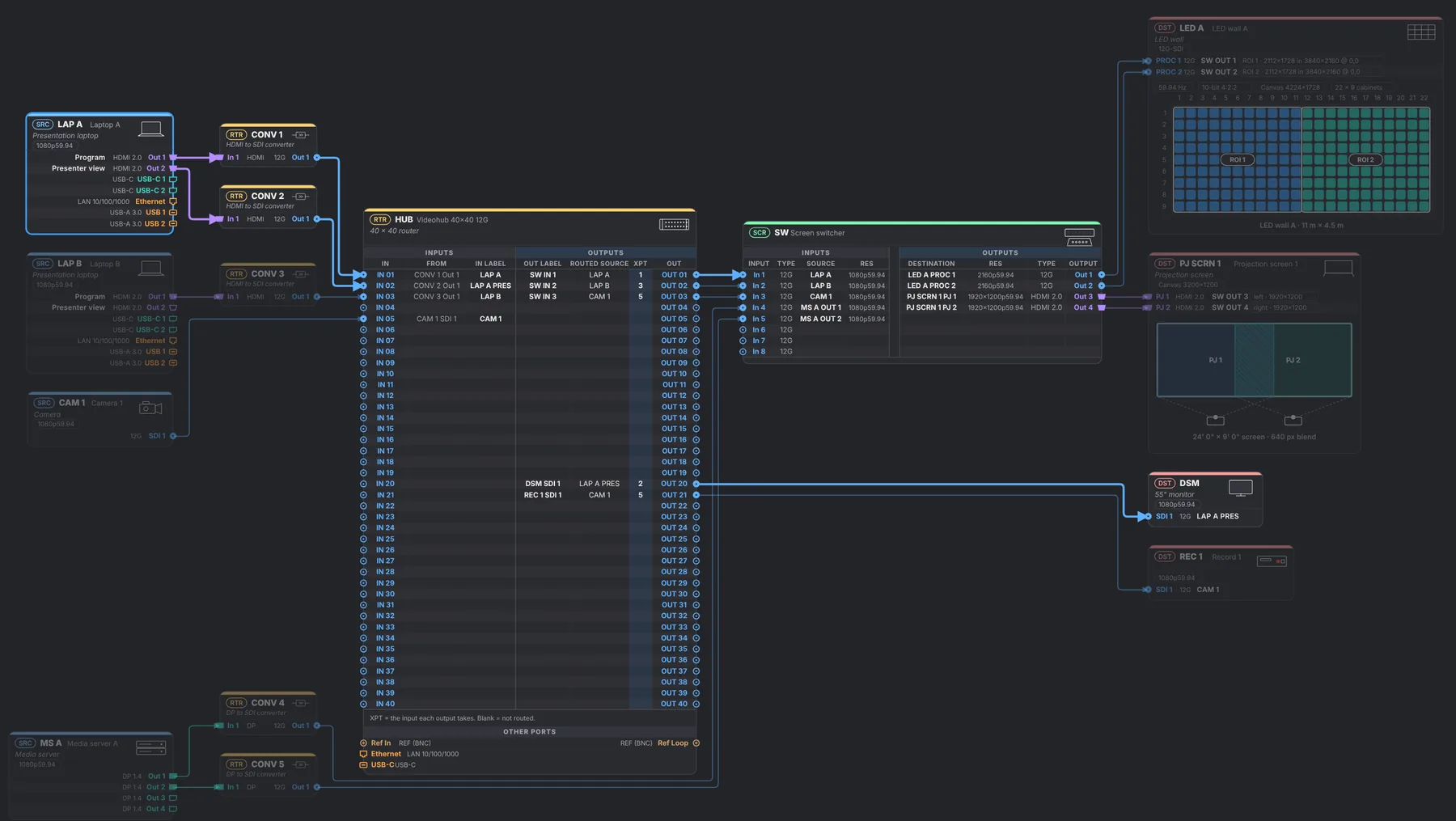
Plan a live event's whole video system before you load in. Patch every port from source to screen, see every cable checked against what HDMI, DisplayPort and SDI can carry, and get the signal flow drawing, gear list, cable schedule and Videohub files from the same patch. Built by a live-events video engineer, for the people who patch the room.
Try the live demo → Support for $10
The demo is a sample show you can rewire and explore. Supporting is a one-time payment with no subscription, and the calculator and EDID export stay free. Last updated .
What you get
- Patch every portSources, routers, switchers and screens, wired port by port. Start from templates for Barco, Analog Way, Blackmagic (Videohub and ATEM), AJA KUMO, Ross, Christie, Panasonic, Sony, Roland, PIXERA, Disguise, Millumin and laptops, or build your own.
- Every cable checkedResolution, rate, bit depth and color format are tested against what HDMI, DisplayPort and SDI can really carry. A missing converter or the wrong connector is flagged, with the reason.
- The drawing draws itselfA signal flow diagram, laid out for you on a plotter sheet (ANSI, ARCH or ISO) with a title block that carries your own logo. Export PDF, SVG or PNG.
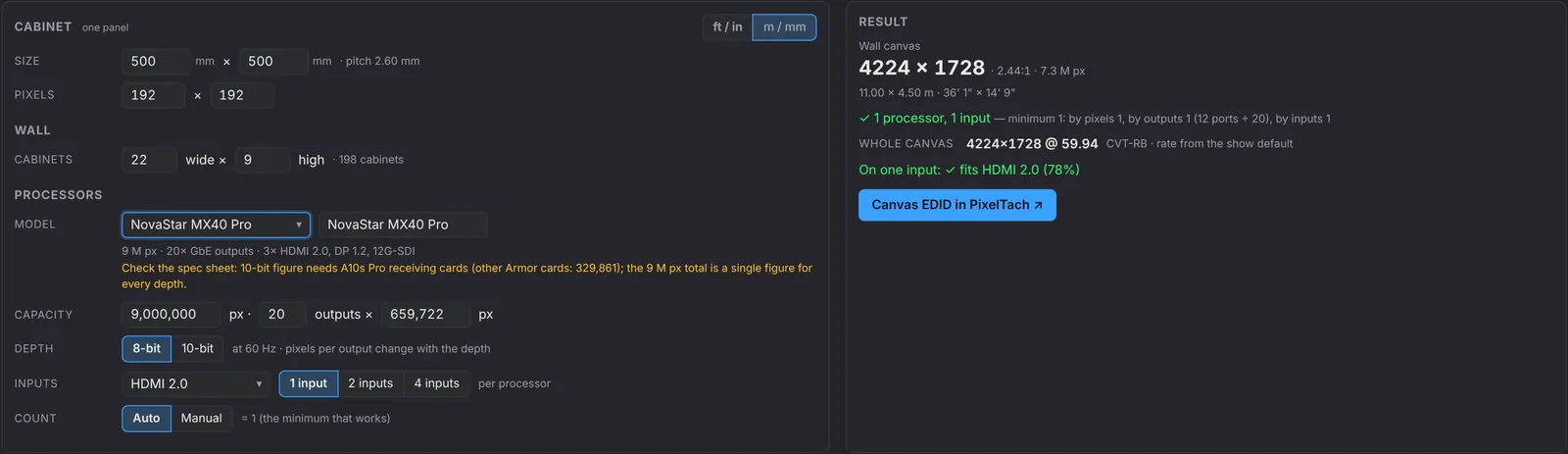
- LED walls and projectionCabinets in, pixels out: canvas size, how many processors, which part of the wall goes to which input. NovaStar and Brompton processors at 8 or 10 bit, Panasonic projectors, blend overlap worked out.
- Your shows, your devicesKeep as many shows as you like in the browser, and save any device you have set up, ports and cards included, to My devices to add it to the next show. One backup file holds everything.
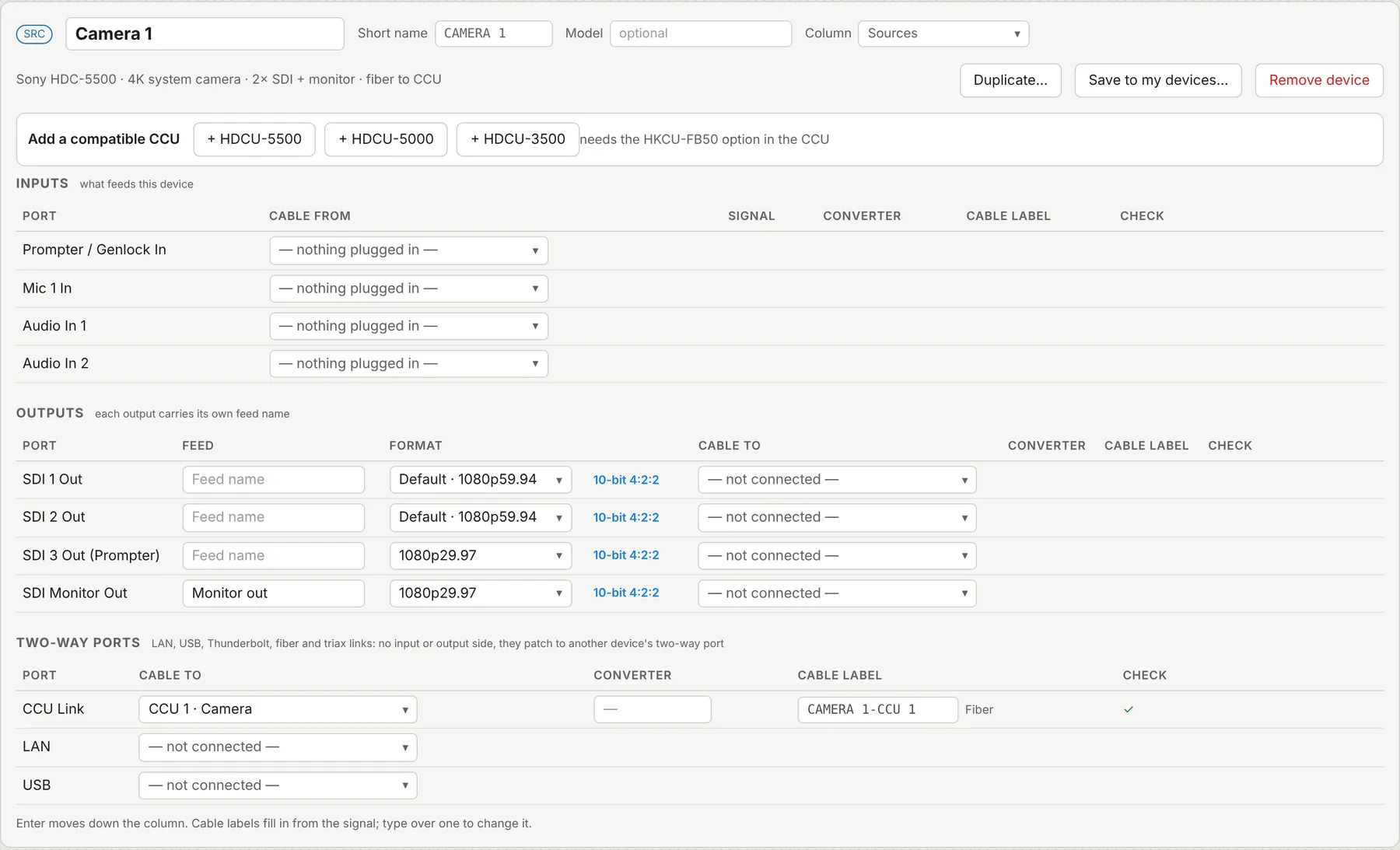
- Cameras and their CCUsSony and Panasonic studio cameras with their camera control units, linked over fiber or triax. Pick a camera and the picker lists the CCUs it works with; a pair the maker doesn't list is refused, and one that needs an option fitted, or that is unconfirmed, is flagged.
- Beyond videoNetwork, USB, Thunderbolt, audio, reference and timecode ports patch and draw too, with two-way links like LAN and USB shown as such. A reference signal patched into an SDI input is flagged.
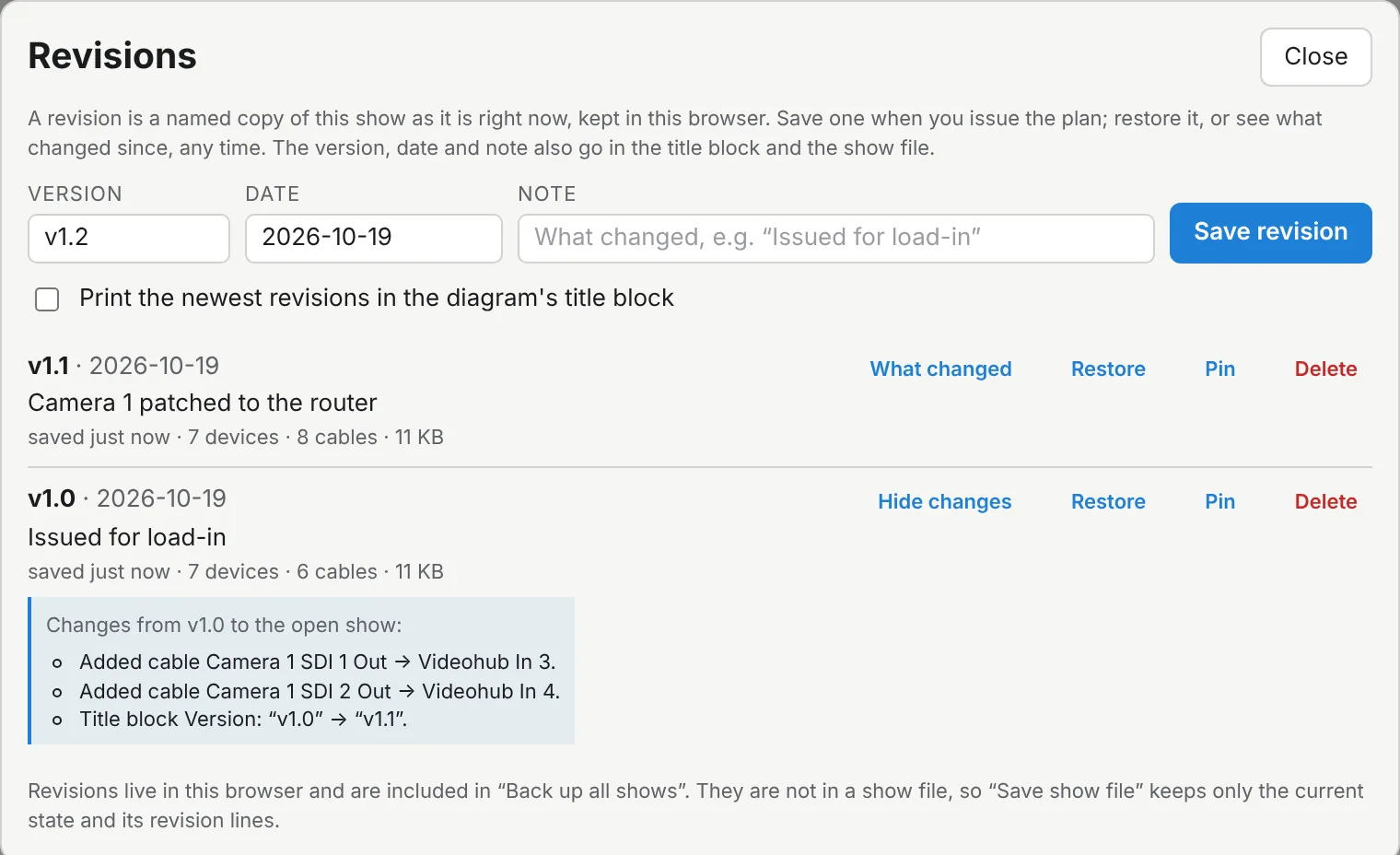
- Revisions and sharingSave named revisions (v1.1, “Issued for load-in”), see what changed since, and restore any of them. Send a show to a colleague as a link or a file: the link carries the whole show in the address itself, so nothing is uploaded.
- Videohub, ready to loadDownload a label set for Blackmagic Videohub Setup, or get ready-to-run commands that send the labels and routes to the router over your network, straight from the plan.
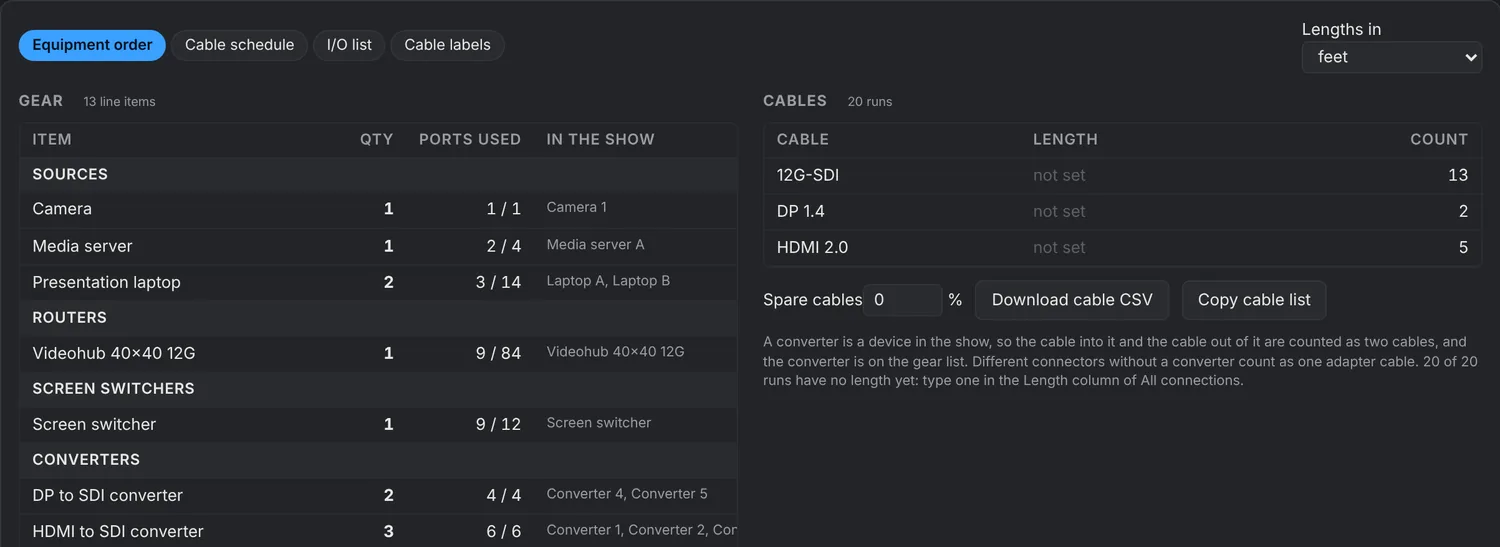
- Paperwork, from the same patchEquipment order, cable schedule, I/O list and cable labels as CSV. Change the patch and the paperwork follows.
See it working

Free demo or supporter
| Live demo | Supporter, one-time $10 | |
|---|---|---|
| Rewire the sample show, run the checks, see the diagram | Yes | Yes |
| Save and open your own shows, and keep your own device library | No | Yes |
| Save named revisions and share a show by link or file | No | Yes |
| Work with no internet at the venue (PixelTach Offline) | No | Yes |
| Export the diagram as PDF, SVG or PNG | No | Yes |
| Videohub label and routing files | No | Yes |
| Equipment order, cable schedule and label CSVs | No | Yes |
| Also included: the multi-output canvas, PixelTach Offline for the calculator, and a say in what's built next | No | Yes |
Your show stays yours. The Planner runs in your browser: nothing is uploaded, and shows are saved on your computer. A share link holds the show in the address itself, so it never passes through PixelTach. With PixelTach Offline on, the Planner also works with no internet at the venue.
Questions
- What is the Signal Flow Planner?
- A browser-based tool for planning a live event's video system. You patch devices port by port, from source to screen. It checks every cable, draws the signal flow diagram, and produces the gear list, cable schedule, cable labels and Videohub files from the same patch.
- Is the Signal Flow Planner free?
- There is a free live demo: a sample show you can rewire and explore, with nothing saved or exported. A one-time $10 payment, with no subscription, unlocks saving and opening your own shows, the exports and the rest of the Supporter Toolbox. The EDID and video timing calculator stays free.
- Does it upload my show?
- No. The Planner runs in your browser: nothing is uploaded. Your shows are saved in this browser on your computer, as many as you like, and can also be saved as .signalflow.json files or in one backup file.
- Does it work offline?
- Yes, for supporters. With PixelTach Offline turned on for your device, the Planner is saved on your computer the first time you open it online. After that it opens and works with no internet at the venue: your saved shows, the checks, the diagram and the PDF, SVG and PNG exports. A small tag in the Planner says when it is ready. Open it online the day before a show: browsers can clear a site's saved data if it goes unused for a long time, and updates wait until you press Reload, so nothing changes mid-show.
- Can I share a show or keep versions of it?
- Yes, for supporters. Save a named revision at any point (for example v1.1, Issued for load-in), see what changed since any revision, and restore one; the version, date and note can also print in the diagram's title block. To send a show to a colleague, copy a share link or send the show file. The link holds the whole show in the address after the # sign, which browsers never send to a server, so the show is not uploaded anywhere. Opening a link needs the Supporter Toolbox; anyone without it is invited to support first.
- How does it check a cable?
- It uses the same engine as the PixelTach calculator: exact video timings first, then what HDMI, DisplayPort and SDI can carry at the resolution, rate, bit depth and color format on that cable. When a cable can't carry the signal it says why, for example which SDI link the format needs, or that a converter is missing.
- Which devices does it cover, and what does the drawing look like?
- It has templates for Barco, Analog Way, Blackmagic (Videohub and ATEM), AJA KUMO, Ross, Christie, Panasonic, Sony (including studio cameras and their CCUs), Roland, PIXERA, Disguise, Millumin and laptops, plus NovaStar and Brompton LED processors and Panasonic projectors, and you can build your own. The diagram prints on ANSI, ARCH or ISO sheets with a title block that can carry your own logo; export it as PDF, SVG or PNG.
Guides
Product and company names are trademarks of their owners. PixelTach is independent and is not affiliated with or endorsed by them.